首頁Home / 充電指南Guide / 技術知識Technical

車場有網絡點充電?Wall Case 3 APP 設定及遙距操作Carpark has a signal? Setting up and running a Wall Case 3 from the app

車位有 Wi-Fi 或流動網絡的話,Wall Case 3 可以全程用手機操作:右滑開始、㩒一下停止、設定延遲充電(最多 16 小時)、調電流、睇充電紀錄,仲可以分享給家人。連加裝置在內,設定一次過搞掂。Where the bay has Wi-Fi or mobile coverage, a Wall Case 3 runs entirely from your phone: swipe to start, tap to stop, set a delay of up to sixteen hours, change the current, review past sessions, and share the unit with the family. Pairing it is a one-time job.

上一篇講車場無網絡點用拍卡。這一篇講另一半:車位有訊號的話,可以做到什麼。

分別不在於充得快慢 —— 兩種模式充電速度一模一樣。分別在於你要唔要落車場。

先決條件:車位有 2.4GHz Wi-Fi 或流動網絡

地庫停車場經常一格訊號都冇,這種情況請看拍卡那一篇,功能完全不減。我們上門勘查時會一併確認訊號情況。

第一次設定:六步加裝置

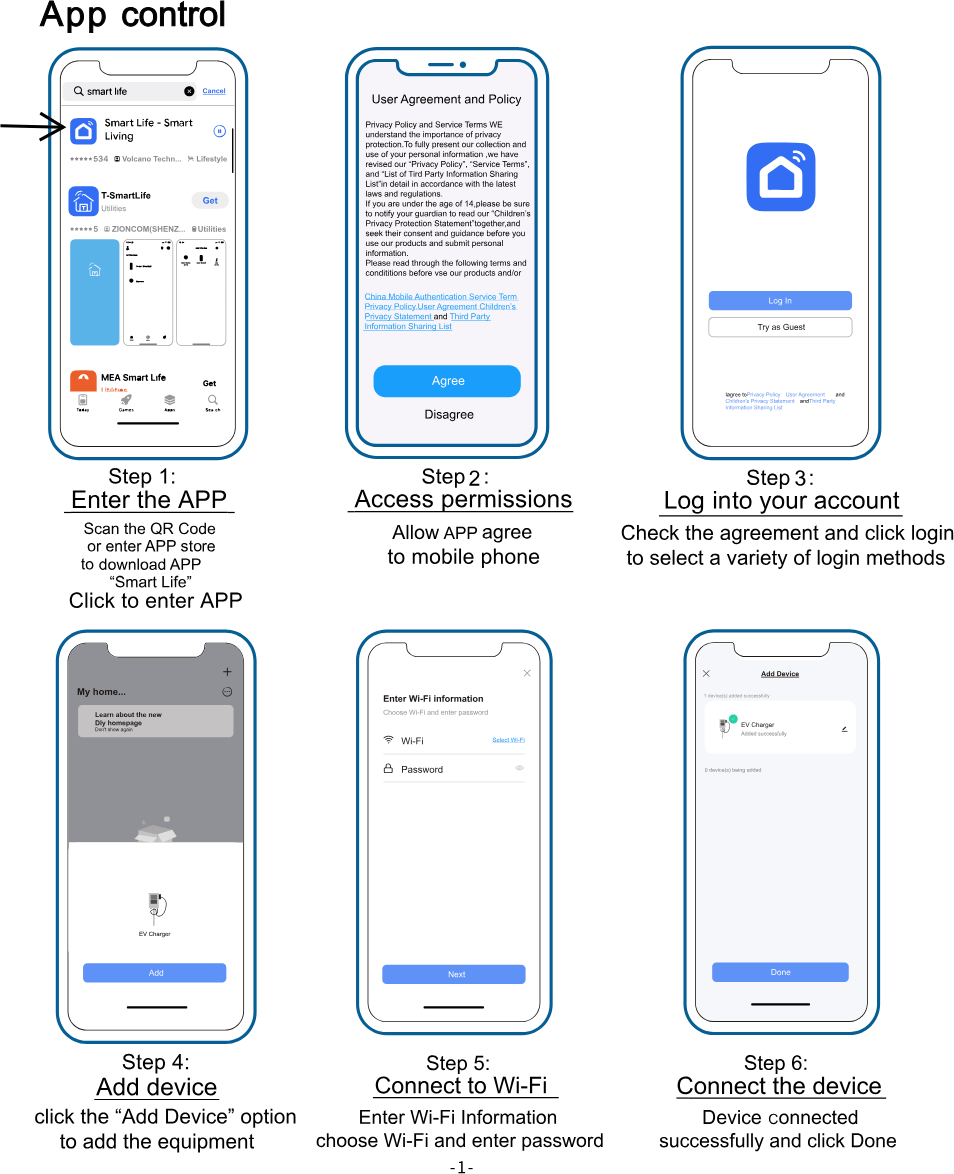
Wall Case 3 APP 設定六步:下載 Smart Life、允許權限、登入、加裝置、連接 Wi-Fi、完成 一次過設定,之後開 APP 就見到部機。

  1. 下載 APP —— 掃機身的 QR code,或在 App Store/Google Play 搜尋「Smart Life」。
  2. 允許權限 —— 按提示允許藍牙及網絡權限,否則搜尋不到裝置。
  3. 登入帳戶 —— 同意條款後登入,可用電郵或第三方帳戶。
  4. 加裝置 —— 在主頁按「Add Device」。
  5. 連接 Wi-Fi —— 揀車場的 Wi-Fi 並輸入密碼。
  6. 完成 —— 顯示「Added successfully」即成功,按 Done。

安裝當日我們會同你一齊行一次這六步,不用自己摸索。

APP 做到什麼

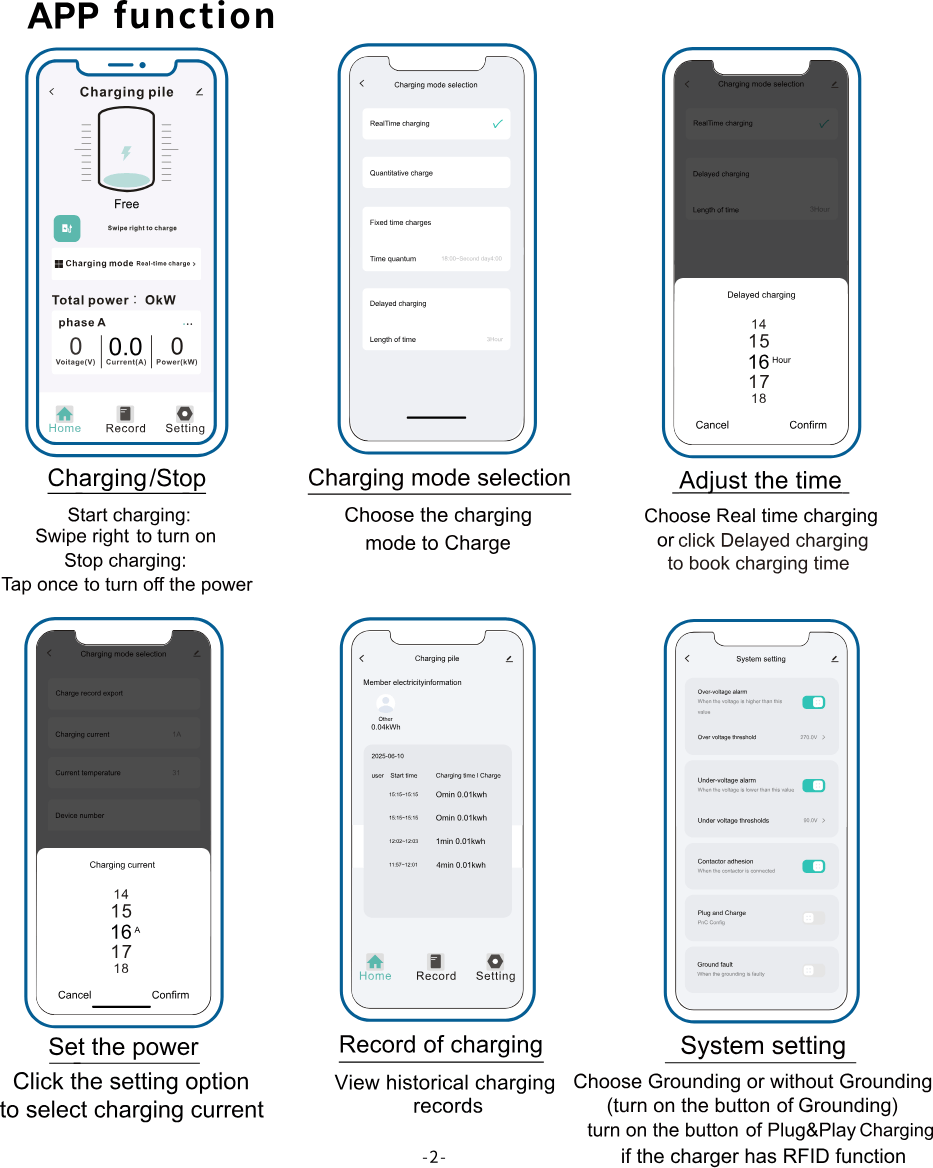
Wall Case 3 APP 功能:開始及停止充電、充電模式、延遲充電時數、調較電流、充電紀錄、系統設定 六個常用功能,全部在同一個畫面入面。

開始及停止

右滑開始充電,㩒一下停止。 主頁同時顯示電壓、電流同即時功率 —— 想知部車而家食緊幾多電,開 APP 就見到。

四種充電模式

模式 做乜
即時充電 插上即充,最常用
定量充電 充夠指定度數自動停
定時充電 設定每日時段,例如 18:00 – 翌日 04:00
延遲充電 由而家起計,幾多小時後才開始(最多 16 小時)

慳電費靠的是後面兩種。中電非高峰由晚上 11 時起、港燈超低谷由凌晨 2 時起 —— 詳見中電分時段電價同港燈分時段供電價目。

APP 同機身最大的分別在這裡。 機身的延遲是「今次充電」的設定,每次插槍要重新㩒;APP 的定時充電可以設定每日重複的時段,設定一次就不用再理。

調較充電電流

由 APP 直接揀 6A 至 32A。電錶容量緊張、或者同屋其他電器同時大量用電時,調低電流就唔會跳掣。

充電紀錄

逐次記錄日期、開始時間、充電時長同用電度數,可匯出。想對賬單、或者想知每月究竟充了多少度,這裡有數。

系統設定

過壓/欠壓保護門檻(預設 270V/90V)、接地故障偵測、接觸器黏連偵測,以及 Plug & Charge(即插即充) —— 開啟後插槍自動開始,不用再拍卡或開 APP。

分享給家人

在裝置設定入面「Share Device」,把部機分享給家人的帳戶,對方接受後同樣可以開關同睇紀錄。不用共用同一個帳戶密碼。

常見問題

APP 連唔上點算? 先確認手機連的是 2.4GHz 那一條 Wi-Fi(很多路由器 2.4G 同 5G 同名,要分開)。仍然不行就 WhatsApp 我們,遠端一齊睇。

車場網絡斷咗,部機仲充唔充到? 充到。網絡只影響遙距操作,充電本身在機身完成。斷網期間用拍卡一樣開到。

APP 同拍卡可唔可以一齊用? 可以,同一部機兩種方式並存。家人有人用卡、有人用 APP 都冇問題。

換咗路由器或者改咗 Wi-Fi 密碼? 在 APP 移除裝置再重新加一次,即上面的第 4 至 6 步。

未裝機?

Wall Case 3 規格及價錢 | 安裝流程及費用

The previous guide covered carparks with no signal. This one covers the other half: what you get when the bay does have coverage.

It isn't charging speed — the two modes charge identically. It's whether you have to go down to the carpark at all.

Prerequisite: 2.4GHz Wi-Fi or mobile coverage at the bay

Basement carparks frequently have neither, in which case the RFID guide applies and nothing is lost. We check coverage during the site survey.

First-time setup: six steps

Six steps to pair a Wall Case 3 with the app: download Smart Life, allow permissions, log in, add device, connect Wi-Fi, done Done once; after that the unit is simply there when you open the app.

  1. Download the app — scan the QR code on the unit, or search "Smart Life" in the App Store or Google Play.
  2. Allow permissions — Bluetooth and network, or the device won't be found.
  3. Log in — accept the terms and sign in by email or a third-party account.
  4. Add device — "Add Device" on the home screen.
  5. Connect Wi-Fi — pick the carpark network and enter the password.
  6. Done — "Added successfully" means it's paired.

We walk through these six steps with you on installation day.

What the app does

Wall Case 3 app functions: start and stop, charging modes, delay timer, charging current, session records, system settings Six functions, all from one screen.

Start and stop

Swipe right to start, tap once to stop. The home screen shows voltage, current and live power — what the car is drawing right now, without going downstairs.

Four charging modes

Mode What it does
Real-time Charges as soon as it's plugged in
Quantitative Stops after a set number of units
Fixed time A daily window, e.g. 18:00 – 04:00
Delayed Starts a set number of hours from now, up to sixteen

The last two are where the savings are. CLP's off-peak starts at 11pm, HK Electric's super off-peak at 2am — see CLP time-of-use and HK Electric EVToU.

This is the real difference from the unit's own buttons. The on-unit delay applies to the current session and is set each time you plug in. The app's fixed-time mode repeats daily — set once and forget.

Charging current

6A to 32A from the app. Where meter capacity is tight, or the rest of the home is drawing heavily, turning it down keeps the breaker in.

Session records

Date, start time, duration and units for every session, exportable. Useful for reconciling a bill, or simply knowing what a month actually costs.

System settings

Over- and under-voltage thresholds (270V and 90V by default), ground fault detection, contactor adhesion detection, and Plug & Charge — with it on, plugging in starts the session with no card and no app.

Sharing with the household

"Share Device" in the device settings sends the unit to another account. Once accepted, they can start, stop and see records — without sharing your password.

Questions we get

It won't connect. Check the phone is on the 2.4GHz network — many routers give 2.4G and 5G the same name and they have to be separated. If it still won't pair, WhatsApp us and we'll look at it with you.

The carpark network is down — can I still charge? Yes. The network only affects remote control; charging happens on the unit. Use the card meanwhile.

Can the app and the card both be used? Yes, on the same unit. One person on a card and another on the app is fine.

I changed router or Wi-Fi password. Remove the device in the app and add it again — steps 4 to 6 above.

Not installed yet?

Wall Case 3 specs and pricing | Installation steps and costs

有問題想查詢?Got a question?

不一定要幫襯才可以查詢。傳送你的情況給我們,我們一樣會回答。You don't have to be a customer to ask. Send us your situation and we'll answer anyway.

延伸閱讀Read next

車場無網絡點充電?Wall Case 3 拍卡及延遲充電設定
技術知識Technical

車場無網絡點充電?Wall Case 3 拍卡及延遲充電設定No signal in the carpark? Charging a Wall Case 3 with RFID and a delay timer

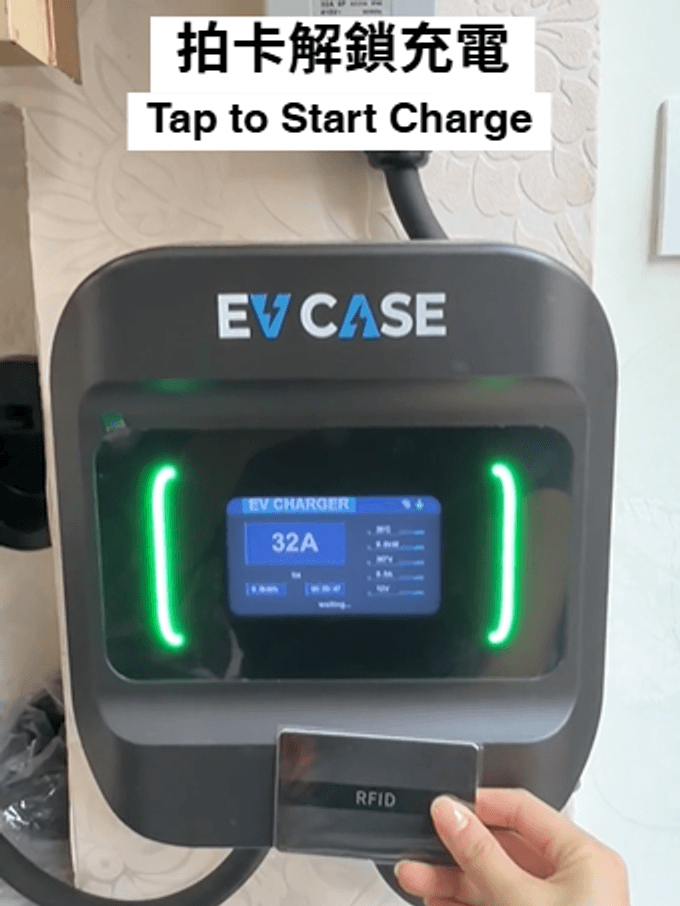
地庫、舊式屋苑停車場,手機經常一格訊號都冇。Wall Case 3 不靠網絡都用得:機身側面兩個掣設定功率同延遲時間,拍卡開始、拍卡停止。連 2 張 RFID 卡。逐步連相片教一次。Basements and older estate carparks routinely have no signal at all. A Wall Case 3 doesn't need one: two buttons on the side set the current and the delay, and an RFID card starts and stops the session. Two cards are included. Here's every step, with photos.

港燈住宅電動車分時段供電價目:凌晨 2 至 6 時回扣 18.7 仙
技術知識Technical

港燈住宅電動車分時段供電價目:凌晨 2 至 6 時回扣 18.7 仙HK Electric's residential EV time-of-use tariff: 18.7 cents back between 2 and 6am

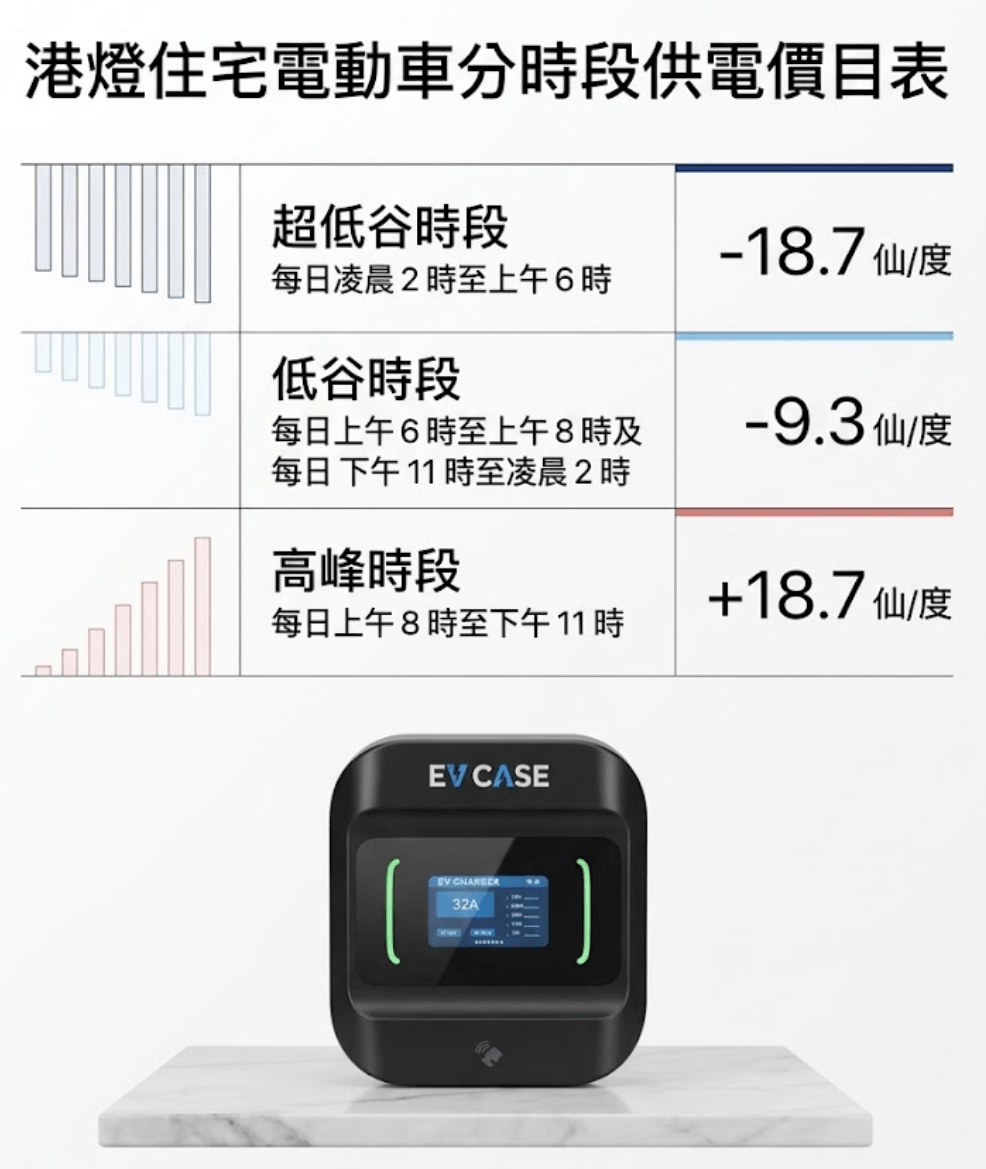
港燈的做法同中電不同:不是兩個價錢,而是在原有電價上加減。超低谷時段(凌晨 2 至 6 時)每度回扣 18.7 仙,高峰時段(上午 8 時至晚上 11 時)每度加 18.7 仙,一來一回相差 37.4 仙。用延遲充電設定,充電器會自己等到凌晨 2 時才開始。HK Electric works differently from CLP: not two prices, but rebates and surcharges on top of the standard tariff. 18.7 cents back per unit in the super off-peak window (2–6am), 18.7 cents added at peak (8am–11pm) — a 37.4-cent swing. Set a delay and the charger waits for 2am on its own.

中電電動車住宅分時段電價:夜晚充電,每度平 43 仙
技術知識Technical

中電電動車住宅分時段電價:夜晚充電,每度平 43 仙CLP's residential EV time-of-use tariff: 43 cents a unit cheaper at night

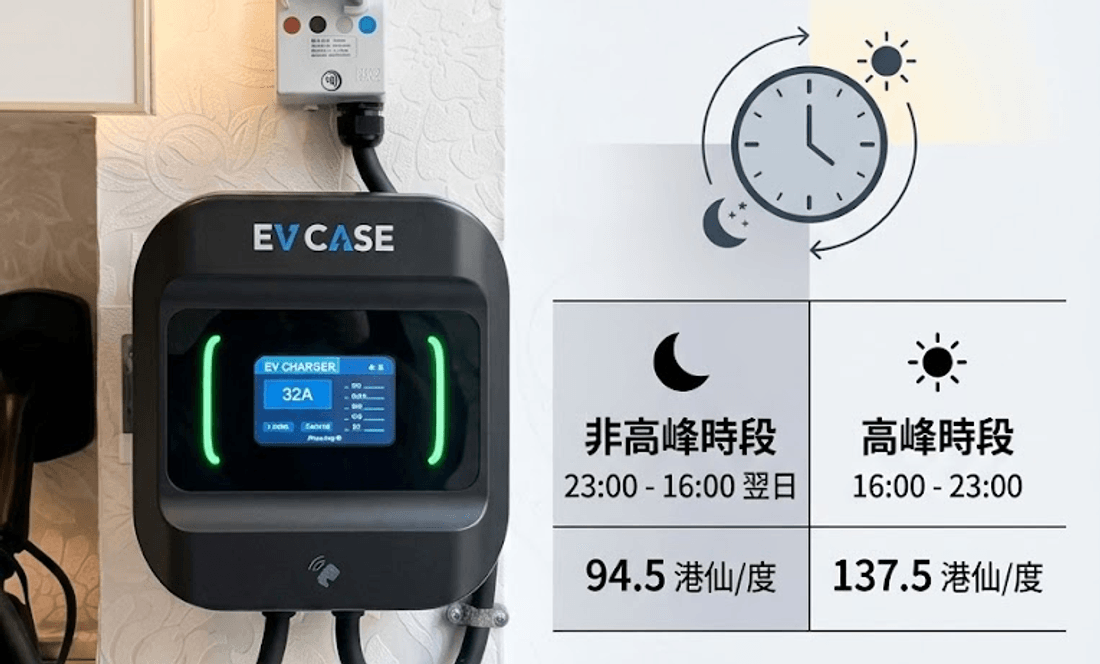
中電「電動車住宅分時段用電價目」非高峰每度 94.5 港仙,高峰每度 137.5 港仙,相差 43 港仙。非高峰時段由晚上 11 時到翌日下午 4 時,長達 17 小時 —— 你本身瞓覺嗰段時間全部包括在內。用延遲充電設定,慳這筆錢不需要改變任何習慣。CLP's residential EV time-of-use tariff charges 94.5 HK cents per unit off-peak against 137.5 on-peak — a 43-cent gap. Off-peak runs 11pm to 4pm the next day, seventeen hours that already contain the whole time you're asleep. A delay timer collects the difference without changing anything you do.

您好!請留下您的車位地址及車位相,即時報價。Hi! Send us your bay address and a photo for an instant quote.